Create or update your meeting notes, directly from your activity tracking Reports At the same time as you track your...

Click to rate this post![Total: 1 Average: 5]
Among the new feature of our new release, you now have the ability to use iOS Reminders sync for each type of actions inside Beesy. This way, every new note you create can now push to Reminders the corresponding actions to help you update and browse your actions on all your Reminders compatible devices.
Many Beesy users have been asking for an iOS Reminders sync for actions they have been adding to their notes.
Once you activate the option within Beesy, the App will automatically sync every new action with Reminders.
Depending on which type of actions you have selected for an iOS Reminders sync, you will be able to browse and update actions in:
– Outlook if you did synchronize Reminders with Exchange
– iOS Reminders for iPhone and iPad if you did synchronize Reminders using iCloud
– Yahoo Task if you set-up your iPad to sync with Yahoo servers.
Only the actions you own yourself will be synced to Reminders, to prevent unnecessary actions to show into Reminders.
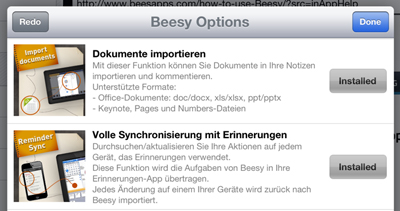
This new feature is an In-App purchase option. To benefit from it, you first need to buy it inside Beesy.
Go to the”Settings” tab > “Additional options“. This will open the In-App purchase wall where you will find the list of available paying options inside Beesy.
To install the iOS Reminders sync feature, tap the “Buy” button (price depends on your local currency) and installation will start after verifying your payment using your iTunes credentials.
Warning: you must have an Internet connection to make this synchronization.
Buying the feature do not automatically trigger the iOS Reminders sync for your actions.
Beesy will let you do so from 2 different manners :
1. Activation : you select which action type you want to synchronize with iOS Reminders.
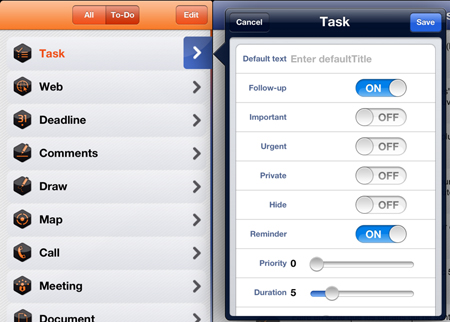
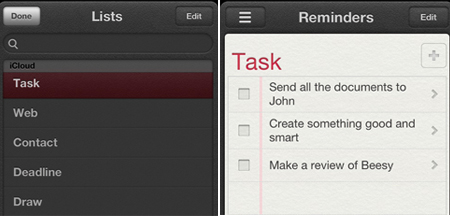
In order to do this, go to the “Actions” tab and open the type property list you wish to synchronize. For instance, if you wish to synchronize the “Task” type (example to the right).
A new toggle field appeared:”Reminders“. By default it’s unactivated. Just modify this switch to toggle it on and this will activate the sync for this type. You need an internet access to initiate this first step
You will need to go through this step for each action type you wish to synchronize with Reminders. Once it is done, every new actions from those types will automatically be synchronized with Reminders.
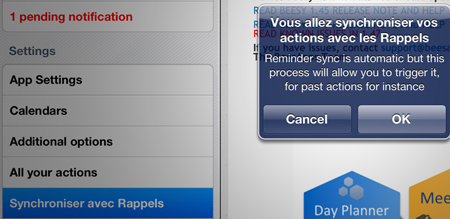
2. Full manual synchronization : this option is available in the “Settings” tab > “Update Reminders“. A pop-up will show (picture to the right) asking for validation.
This will let you manually push all the activated actions to Reminders. It is required for all the former actions you have been adding to Beesy.
Once finished, you will be able to browse all your activated actions inside Outlook, Yahoo or Reminders.
This manuel full synchronization is the only way to push all your past actions to Outlook, Yahoo or Reminders. It can help as well if somehow Reminders and Beesy get out of sync.
Updating your actions can be done both ways, you now can update actions from Outlook, Yahoo or Reminders:
– Add / Modify the content of an action,
– Change its due date ,
– Change its status from completed to open or the other way around.Those modifications will automatically show inside Beesy.
Our goal at BeesApps is to offer businesses complete, fully customizable management tools that will make it easier to manage activities and increase team productivity. This month, we have the pleasure of introducing a host of brand-new features to the dashboard that...

Create or update your meeting notes, directly from your activity tracking Reports At the same time as you track your KPIs on a project, you can update the action plan of your meetings, and follow the progress directly on your reports. You can also create a new meeting...
At BeesApps, our goal is to provide companies with complete and fully customizable management tools to facilitate activity monitoring and increase team efficiency. This month, we are pleased to present a series of new features in the dashboard to facilitate the...